
I’ve been a huge fan of the Calendex ever since I started Bullet Journaling (BuJo) and subsequently found-out about your system. I have modified it a bit to suit my purposes and I’d like to run through how I have implemented my “own” version of it.
I have 2 types of items I reference in my Calendex. I’ll call them TODOs and IMPROMPTUs. : )
My TODOs are just like they sound; a list of TO DO items I keep in a section of my BuJo. This list has grown over the years and is called my MASTER TO DO LIST. It has now been formalized as follows:
1) TODOs are items that have more of a “permanent” place in my life. They are things I need to do each year. They are items that are oft-used / daily / weekly / monthly / periodic in nature. They are items I tend to need to remember to do from year to year to year that I don’t want to keep track of.
2) TODOs are represented by a letter code, “A, B, C, D, …” all the way up through Z for the first 26 entries. The 27th and subsequent entries are designated as “A1, B1, C1, D1, …” all the way up through Z1. The 53rd item is “A2” then “B2, C2, …” and I think you get the idea. Theoretically the list can go on and on without a letter code ever repeating.
3) TODOs can be listed individually as well as be referenced as a group. For example, a yearly chore I have created is using my powerwasher to clean various items around the house like powerwashing the front door, the front porch, our daughter’s wheelchair, our laundry hampers, garbage cans, etc. In my TODOs it looks like this:
(MASTER TO DO LIST except…)
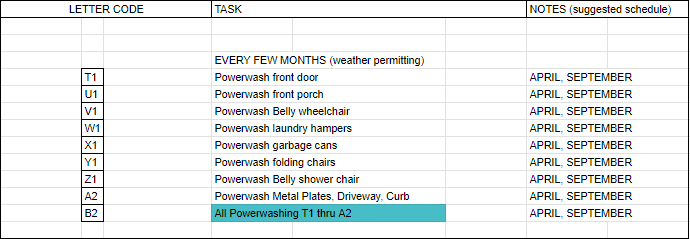
I often find myself doing the powerwash TODOs all at the same time, so I created a letter code “B2” that represents the entire group of powerwash items. I will show how my “B2” letter code group is a real space-saver and time-saver in my CALENDEX in just a moment.
IMPROMPTUs as I call them are a bit more like your original CALENDEX idea, where the number in the CALENDEX square refers to a page number found in the BuJo daily pages. But I modified it a bit to accommodate multiple items on the same page. And I modified my CALENDEX layout to a 2 page layout PER month, instead of a 1 or 2 page layout per year. This way I get to have more entries per day, which better reflects how my life goes from day to day (especially on the weekends!). The downside to my adaptation is I don’t get the bird’s eye view of the entire year’s events.
So IMPROMPTUs can be TO DO items that don’t live in the MASTER TO DO LIST. But they can also actually be TO DO items that are not periodic / seasonal / pre-planned / oft-repeating. They are the one-offs. The doctor visits. The school meeting reminders. Appointments of any kind.
In the daily pages they look like this:
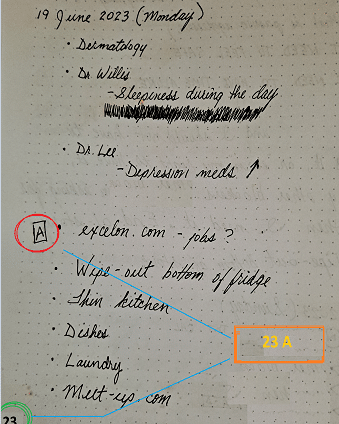
In the example above, I’m in my daily pages in my BuJo (this one happens to be on 19 June, 2023) where I have indicated on page 23 that I want to check-out a website I heard about in-passing at the grocery store. I think it was spelled excelon.com (I’ve not checked-out out yet). I have put a letter A inside of a square to indicate that this is an item I want to check-out, but not necessarily today. If I want to follow-up on this item, it will be identified as item “23 A”.
In my CALENDEX for June 2023, I have indicated that the day I have chosen to follow-up on this item is Sunday, the 25th. So, on the 25th, I have filled-in the next available square with “23 A” which means go to page 23 and look for item labeled “A” for more information. I can make the notes for “23 A” as short or as extensive as I like, I just happened to just write down the URL of the website because I think there may be job leads there.
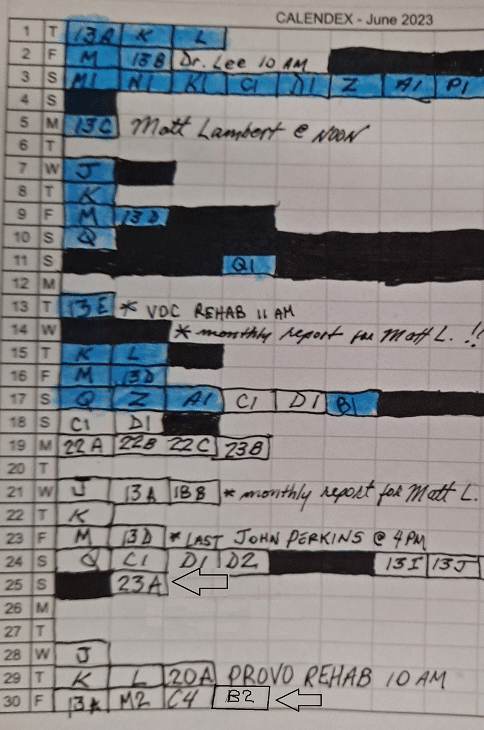
In the example above, on the 25th of June, you can see “23 A” in the box. This means “on the 25th of June, turn to page 23, find item A and follow-up on what notes are listed for that item.”
And then, on the 30th of June, the item “B 2” means … go through and do all of the powerwash items that “B 2” represents. The convenience of just listing “B 2” means that I can reference the 8 items that I want to accomplish that day with just ONE entry. And if for some reason that Friday is not a good day to do the powerwashing…I can cross-out “B 2” on Friday and move it to another day. All I have to do is move “B 2”. I don’t have to re-copy all 8 items!
This is the great thing about BuJo and the concept of the CALENDEX!! It can be adapted to your particular needs and still serve it’s original purpose. Nothing is lost and everything is gained by taking these concepts and making them your own!
-Tom K

Do you have 2 page monthly spreads placed in advance? If it’s January and and page 3 A is eye dr appointment on August 14th it’s 3A but does it go right to August or to somewhere else? How in August are you aware of this?